The Mac app

Lucas Control for Mac

The Mac app adds what only a Mac can do: using your Mac's apps, files and home devices. Same account, same plan, same credits.

Web, Mac and iPhone

Where you can use Lucas

Where you can use Lucas: on the web, on a Mac and on an iPhone
What Lucas doesWeb appAvailable nowMac appiPhone app (coming soon)
Everyday
Chat with Lucas, with web search and sourcesIncludedIncludedComing soon
Agent mode: give Lucas a goal and he finishes itHe shows a short plan and the cost first, then works through it. Anything that sends, spends or changes still waits for you.IncludedIncludedComing soon
Lucas shows his work as he goesA timer, each step as it finishes and the pictures he makes, so you can see what he is doing.IncludedIncludedComing soon
Thorough research: a report with numbered sourcesYou see the cost in credits first. The report comes as a file you can keep.IncludedIncludedComing soon
Auto picks the AI for each request, or you chooseIncludedIncludedComing soon
Second and third opinions from another AIIncludedIncludedComing soon
Talk: speak to Lucas and hear him answerIncludedIncludedComing soon
Attach files and photos, and Lucas reads themOn iPhone, from the camera, your photos or the Files app.IncludedIncludedComing soon
Documents Lucas makes: Word, PDF, Excel, MarkdownIncludedIncludedComing soon
Images: generate and editIncludedIncludedComing soon
Films: from a script to a finished cutScript, look, cast, storyboard, shots and sound, one step at a time. You see each price before it runs.IncludedIncludedComing soon
Lucas builds websites and appsIncludedIncludedComing soon
Publish a website Lucas built, at your-name.lucassites.comPrivate until you press Publish. Pages, styles, scripts and pictures; server code and databases aren't supported yet. On the Mac you publish from the finished website's card; the list of your websites is on the web and iPhone.IncludedIncludedComing soon
Memory, projects and the skills libraryIncludedIncludedComing soon
Personality and answer styleComing soonIncludedComing soon
Connect the services you useOn the web: 28 services you connect with a key or a sign-in, plus any MCP server. The Mac app adds many more, like email, calendars, stores, social accounts and home devices. On iPhone, Lucas uses the ones you connected on the web.IncludedIncludedNot on iPhone
Share replies and chats, and invite friendsIncludedIncludedComing soon
Scheduled tasksOn the web they run in the cloud, even with your computer off. The Mac also runs its own schedules while it's open.IncludedIncludedComing soon
Your Mac
Files and folders on your MacNot on the webIncludedNot on iPhone
Calendar, Reminders, Notes, Mail, Messages, Contacts and PhotosThe apps on your Mac, each switched on by you.Not on the webIncludedNot on iPhone
Lucas uses your Mac and his own browser, with your OKNot on the webIncludedNot on iPhone
Lights and devices on your home networkNot on the webIncludedNot on iPhone
Menu bar, open at login and Mac notificationsNot on the webIncludedNot on iPhone
Advanced Charting & Trading add-on (crypto charts)An add-on for the Mac app that isn't on sale yet.Coming soonComing soonNot on iPhone
On the go
One account and the same chats on every devicePrivate chats are never saved, and chats you keep on your Mac never leave it.IncludedIncludedComing soon
Approve what your Mac asks, from anywhereTurn it on in the Mac app: Settings, Phone and web. Then a request from your Mac shows up on the web and on your phone.IncludedIncludedComing soon
A notice when a long reply is readyOn the web, a browser notice if you allow it. On the Mac, a banner. On iPhone, a notification.IncludedIncludedComing soon

Apple Watch is planned.

Included
you can use it there
Coming soon
not available there yet
Not on…
that app doesn't have it

Last checked November 17, 2026.

Download for Mac

Needs macOS 13 or later, on Apple silicon or Intel. Sign in with the same account you use on the web. Updates install themselves.

Not sure? Apple menu > About This Mac: Chip = Apple silicon, Processor = Intel

How to install

  1. Open the downloaded file (its name ends in .dmg).
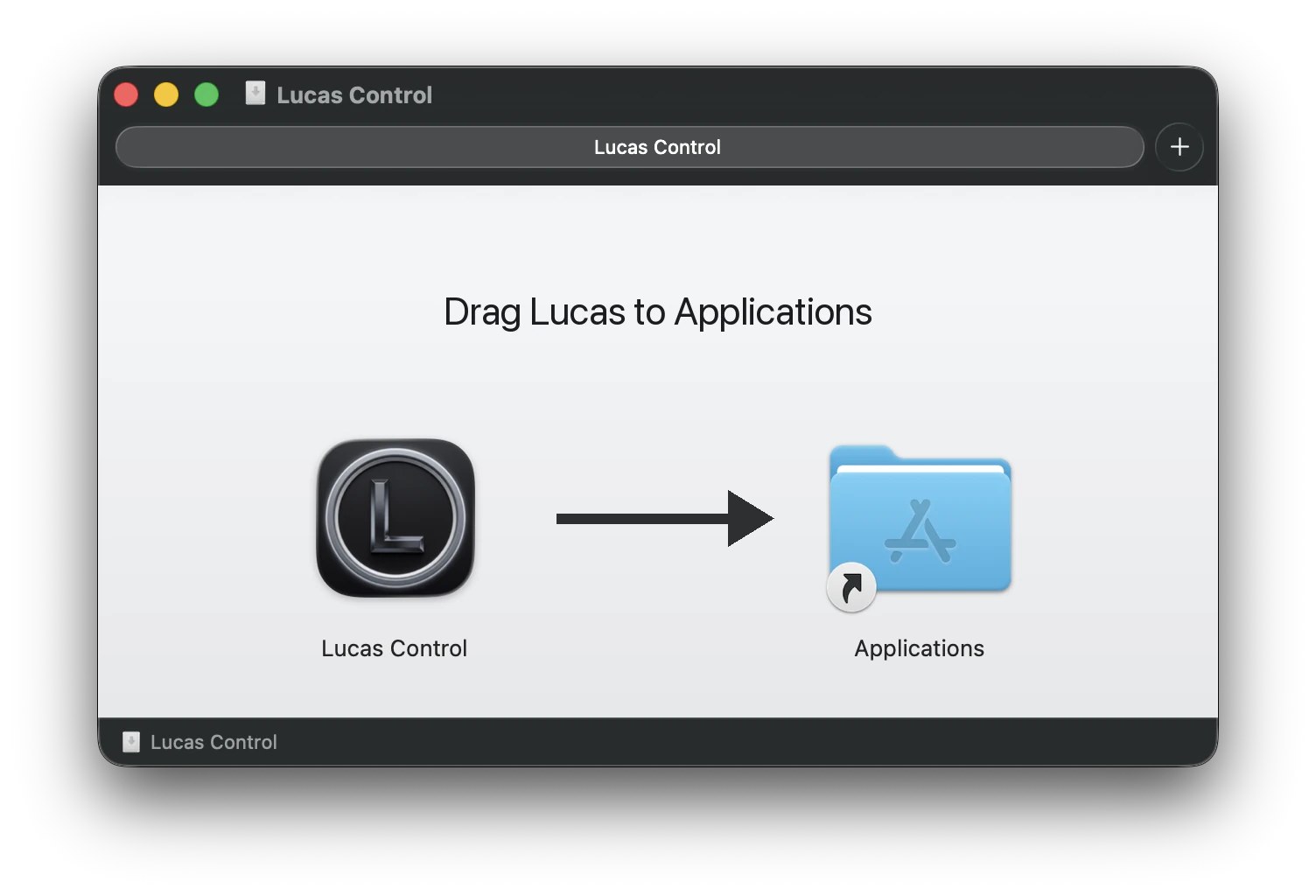
  2. Drag Lucas Control into Applications.
  3. Open Lucas Control from Applications and sign in.

Lucas Control is signed and notarized with Apple. The first time you open it, macOS asks whether to open an app downloaded from the internet: choose Open.
Lucas for iPhone Coming soon

Not yet. The iPhone version is Coming soon, and there's no Android app yet.

Lucas for Apple Watch

Apple Watch is planned.

The Lucas Control installer window with the app icon and an Applications folder to drag it into.
Drag, drop, doneInstall Lucas Control like any Mac app.